Language

Gaming Controller – Precision Control for Modern Gaming
In today’s gaming industry, control precision and responsiveness are critical factors that influence gameplay performance. Whether competing in fast-paced action games, navigating expansive open worlds, or executing precise maneuvers in racing simulations, the right controller can significantly enhance the overall gaming experience. A professional Gaming Controller is designed to provide accurate input response, ergonomic comfort, and seamless compatibility across multiple gaming platforms.
Unlike standard controllers, modern gaming controllers incorporate advanced features such as responsive analog sticks, high-precision triggers, vibration feedback, wireless connectivity, and long-lasting battery life. These features allow players to achieve greater control accuracy while maintaining comfort during extended gaming sessions.
This comprehensive guide explores the functionality, design advantages, technical specifications, and practical applications of a high-quality Gaming Controller, helping gamers understand why it remains one of the most essential gaming accessories available today.
What Is a Gaming Controller?
A Gaming Controller is a handheld input device used to interact with video games on consoles, personal computers, and mobile devices. It translates player actions into digital signals that control characters, vehicles, or other elements within a game.
Modern controllers are engineered to deliver smooth, responsive input while supporting a wide variety of gaming genres. From competitive shooters to immersive adventure games, a reliable Gaming Controller allows players to maintain accurate control over every movement and action.
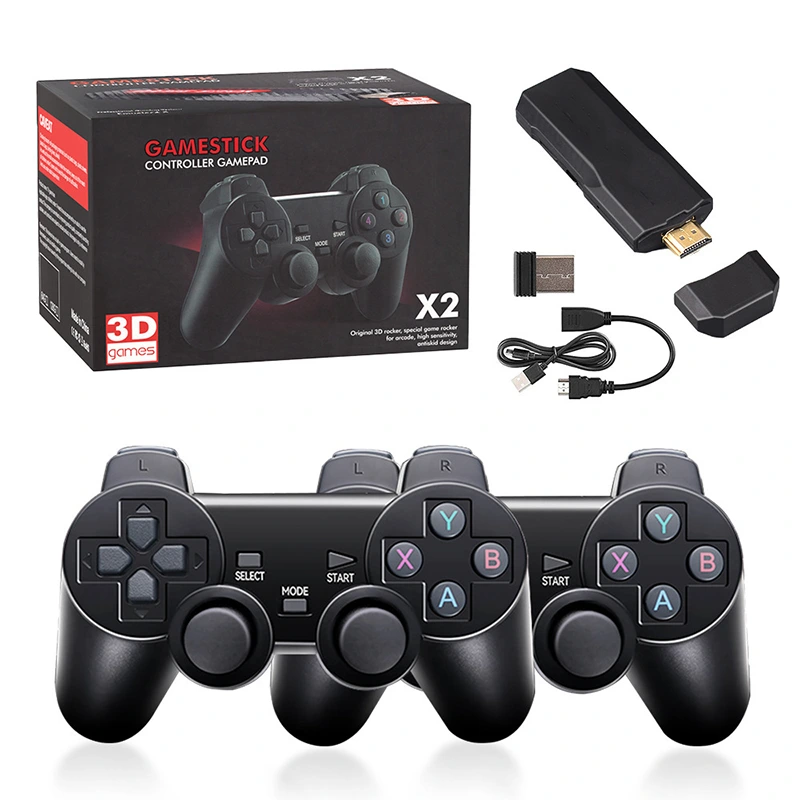
Typical gaming controllers include several essential components such as analog sticks, directional pads, action buttons, shoulder triggers, vibration motors, and connectivity modules. Together, these components create a versatile input device capable of handling complex gameplay mechanics.
Core Features of a Professional Gaming Controller
A high-quality Gaming Controller integrates multiple technologies designed to enhance precision, comfort, and gameplay responsiveness.
High-Precision Analog Sticks
Analog sticks are the primary input mechanism for movement and camera control in most modern games. A premium gaming controller utilizes high-sensitivity analog sensors that deliver smooth directional movement with minimal dead zones.
These components allow players to perform precise aiming, character navigation, and camera adjustments with exceptional accuracy.
Responsive Trigger Buttons
Trigger buttons are commonly used for acceleration, braking, shooting, or other gameplay mechanics. Advanced Gaming Controller designs include pressure-sensitive triggers that detect varying levels of force, allowing for more realistic control in racing or action games.
Ergonomic Grip Design
Long gaming sessions require a comfortable controller shape that minimizes hand fatigue. A modern Gaming Controller typically features curved grips, textured surfaces, and balanced weight distribution to support extended gameplay.
Vibration Feedback Technology
Vibration motors enhance immersion by providing tactile feedback during gameplay events. Explosions, collisions, or environmental effects can be felt through the controller, making the experience more engaging.
Multi-Platform Compatibility
Many controllers support multiple devices, including gaming consoles, PCs, tablets, and smartphones. This versatility allows users to enjoy the same Gaming Controller across different gaming ecosystems.
Gaming Controller Technical Specifications
A professional Gaming Controller is built with advanced hardware components designed to deliver consistent performance and durability. Typical specifications include high-precision analog sensors, multi-layer circuit boards, durable mechanical buttons, and long-lasting battery systems.
The controller usually includes dual analog sticks with high sensitivity for precise directional input and camera control. These sticks are engineered with anti-drift technology to maintain accuracy over long periods of use.
The directional pad, often referred to as the D-pad, allows players to perform quick directional commands, making it especially useful for platform games and fighting games that require precise button combinations.
Action buttons are typically designed with responsive mechanical switches that provide tactile feedback. These buttons allow rapid input during fast-paced gameplay scenarios.
Shoulder buttons and triggers are positioned at the top of the controller to allow quick access during gameplay. Many advanced Gaming Controller models include analog triggers capable of detecting different levels of pressure.
Wireless connectivity is a standard feature in many modern controllers. Bluetooth technology allows seamless pairing with consoles, PCs, and mobile devices while maintaining low input latency.
Battery systems vary depending on the controller model. Many devices feature rechargeable lithium batteries capable of providing several hours of continuous gameplay on a single charge.
The controller housing is usually constructed from durable ABS materials combined with textured grips to improve handling stability. This design ensures that the controller remains comfortable even during intense gaming sessions.
Advantages of Using a Gaming Controller
Improved Control Precision
A Gaming Controller provides precise input that allows players to control character movements smoothly. Analog sticks and pressure-sensitive triggers offer more nuanced control compared to keyboard inputs.
Enhanced Gameplay Comfort
Controllers are designed to fit naturally in the hands, reducing strain during long sessions. The ergonomic layout ensures that essential buttons are easily accessible.
Greater Immersion
Vibration feedback systems allow players to feel in-game actions through the controller. This tactile feedback adds a layer of realism that enhances the overall gaming experience.
Versatility Across Game Genres
Controllers are suitable for a wide range of game genres including sports games, racing games, action adventures, and fighting games.
Easy Plug-and-Play Connectivity
Most controllers can connect instantly to gaming systems without complex configuration. This simplicity makes them convenient for both casual and professional gamers.
Gaming Controller Design and Build Quality
A well-designed Gaming Controller combines durability with ergonomic comfort.
The outer shell is typically constructed from reinforced plastic materials that resist wear and impact damage. Textured grips prevent slipping during intense gameplay.
The internal circuit system uses high-quality electronic components that ensure reliable signal transmission between the controller and gaming system.
Button placement is carefully engineered to support natural finger positioning. This reduces fatigue and allows faster response times during competitive gaming.
The controller’s weight is also carefully balanced. A controller that is too light may feel unstable, while one that is too heavy can cause fatigue. A balanced design provides a comfortable feel during extended use.
Gaming Controller Compatibility
One of the most important advantages of a modern Gaming Controller is its ability to function across multiple devices.
Most controllers are compatible with desktop computers, gaming laptops, and popular gaming consoles. In addition, many models support mobile gaming through Bluetooth connectivity.
This versatility allows gamers to use the same controller for different platforms without needing separate accessories.
Gaming Controller Performance in Different Game Types
Racing Games
In racing simulations, analog triggers provide precise control over acceleration and braking. This allows players to adjust vehicle speed more accurately.
Sports Games
Sports titles benefit from the intuitive button layout of a Gaming Controller, making it easier to perform passes, shots, and player movements.
Action and Adventure Games
Controllers offer smooth character movement and camera control, which is essential in open-world and action adventure games.
Fighting Games
The directional pad and responsive buttons allow players to execute complex move combinations with precision.
How to Choose the Right Gaming Controller
Selecting the best Gaming Controller requires considering several important factors.
The first factor is compatibility with your gaming platform. Ensure that the controller supports the device you use most frequently.
Ergonomic design is also critical. A comfortable controller reduces fatigue and improves gameplay performance.
Connectivity options should also be evaluated. Some players prefer wired controllers for stable connections, while others prefer wireless controllers for greater flexibility.
Battery life is another important factor. Long-lasting batteries ensure uninterrupted gaming sessions.
Build quality should also be considered. Durable materials and high-quality components ensure the controller remains reliable over time.
Gaming Controller Setup and Usage
Using a Gaming Controller is usually straightforward.
First, connect the controller to the gaming device using either a USB cable or Bluetooth pairing. Once connected, the system automatically detects the controller.
Players can then configure button mappings within the game settings if customization is desired.
After setup, the controller is ready to deliver responsive gameplay with precise control.
Gaming Controller FAQ
Q1: What makes a Gaming Controller better than keyboard and mouse controls?
A Gaming Controller offers analog input that allows for smoother and more precise movement. Unlike keyboards that rely on digital on/off inputs, analog sticks allow gradual directional movement. This makes controllers especially effective for racing games, sports games, and action adventure titles. Additionally, controllers are ergonomically designed to be held comfortably for long periods, which can reduce hand fatigue during extended gameplay sessions.
Q2: Can a Gaming Controller be used on multiple devices?
Yes, most modern Gaming Controller models are designed to support multiple platforms. They typically include USB connectivity for PCs and consoles, as well as Bluetooth support for smartphones and tablets. This multi-platform compatibility allows gamers to switch between devices without needing separate controllers for each system.
Q3: How long does the battery last on a wireless Gaming Controller?
Battery life depends on the specific controller model and usage conditions. A typical wireless Gaming Controller can operate for approximately 8 to 20 hours on a full charge. Factors such as vibration feedback, wireless signal strength, and LED indicators may influence battery consumption. Many controllers also support fast charging or wired play while charging.
Q4: Are Gaming Controllers suitable for competitive gaming?
Yes, many professional players use a Gaming Controller in competitive gaming environments. Controllers provide precise analog input and responsive button layouts that are well suited for certain game genres. Competitive titles such as sports games, racing simulations, and fighting games are often played using controllers due to their accuracy and intuitive controls.
Conclusion
A high-quality Gaming Controller is an essential accessory for gamers who value precision, comfort, and immersive gameplay. With advanced analog controls, responsive triggers, vibration feedback, and multi-platform compatibility, modern controllers offer an intuitive and engaging way to interact with games.
Whether playing competitive esports titles, exploring open-world adventures, or enjoying casual gaming sessions, a reliable Gaming Controller provides the control accuracy and comfort necessary for an exceptional gaming experience